Quick answer: If Overseer Bandages are missing from your Roblox The Hollow shop, first check the live shop category, scroll through the full avatar-item grid, and rejoin the event hub once. Current third-party guides disagree about the item’s reported price, and none of the sources reviewed proves that every account or server must show the same shop card. Treat the in-game listing as the final authority.
On October 30, 2026, the most useful distinction is between an item that has rotated out of the visible “new today” slot, an item that is lower in the shop grid, and a genuine loading or inventory issue. Those can look identical at a glance but need different fixes. This guide separates what current reporting says from what you can verify in your own account.

Are Overseer Bandages still available?
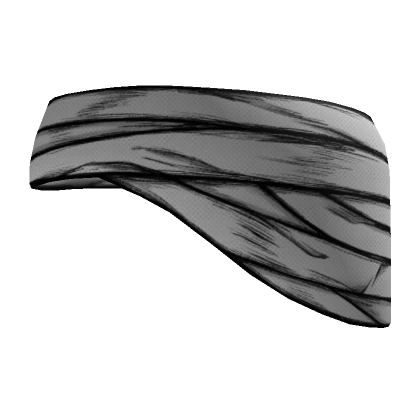
Third-party coverage published around October 29 reports Overseer Bandages as a ticket-shop item in The Hollow. One current shop guide lists 20 Tickets, while another event tracker records a conflicting 60-Ticket report and explicitly marks the price as unconfirmed. That conflict is a reason to inspect your live shop card—not a reason to assume the item was removed or discounted.
Roblox’s official announcement confirms that The Hollow includes limited-time avatar items, daily mazes and quests, and a reward-collection window that continues until noon Pacific Standard Time on November 2. The announcement does not provide a complete item-by-item ticket price list or promise that every shop item stays in the same position.
Try these checks before assuming the item is gone
- Open the official hub: Launch The Hollow by Roblox Presents from the official Roblox experience page.
- Open the shop itself: Use the event’s ticket/shop button and inspect the full Avatar Items grid, not only the newest-item tile.
- Look for the exact name: Check for “Overseer Bandages.” Do not confuse it with a generic bandage accessory or another event reward.
- Rejoin once: If the shop card is blank, the grid fails to load, or your balance does not refresh, leave and rejoin the hub before trying again.
- Check your inventory: If you previously bought the item, confirm whether it is already in your Roblox inventory before spending tickets again.
- Capture the evidence: If the card is absent or shows an unexpected price, save a screenshot that includes the item grid and your current server state.

What if the shop shows 20 Tickets, 60 Tickets, or no listing?
| What you see | What it means | Best next step |
|---|---|---|
| Overseer Bandages listed at 20 Tickets | A current third-party guide reports this price, but Roblox has not published a full official price sheet. | Confirm the price on your own live item card before buying. |
| Overseer Bandages listed at 60 Tickets | Another tracker has recorded a 60-Ticket report; the exact price remains disputed in public guides. | Trust the in-game price shown to your account and capture a screenshot if it conflicts with a guide. |
| Item not visible in the grid | It may be outside the visible area, the shop may not have loaded correctly, or the item may no longer be offered in that view. | Scroll the full grid, reopen the shop, and rejoin once. |
| Purchase appears successful but item is missing | The inventory may not have refreshed, or the purchase may not have completed. | Check purchase history/inventory and Roblox support before attempting another purchase. |
How to avoid wasting event Tickets
Do not buy a substitute item simply because you cannot find Overseer Bandages on the first screen. First decide whether the accessory is your priority, check the price currently displayed, and compare it with the items you still want to claim. The shop’s reported price information is community-sourced, so a guide should never override the live listing.
- Check the item preview before confirming a purchase.
- Confirm your Ticket balance before and after the transaction.
- Do not repeat a purchase if the first transaction is still processing.
- Ignore third-party sites that ask for your password, verification code, or browser session cookie to “restore” a missing item.
- Use Roblox’s official help channels if the transaction completed but the item does not appear in your account.
Official sources and social updates
Roblox’s newsroom confirms the broad event dates and reward framework, but not the live price or availability of every ticket-shop item. For the current listing, check the game itself first. You can also review Roblox’s official event announcement and Roblox’s official X account for event-level announcements.
Follow Roblox for official platform and event announcements.
— Roblox (@Roblox) Official X account
There is no verified official post in the sources reviewed that guarantees Overseer Bandages will remain visible to every player or confirms a universal price. Avoid treating reposted screenshots as a live server check.
Frequently asked questions
Why are Overseer Bandages missing from my Roblox The Hollow shop?
Check the full Avatar Items grid, reopen the shop, and rejoin the event hub once. Public guides report the item, but do not prove that every server or account displays the same card at the same time.
Do Overseer Bandages cost 20 or 60 Tickets?
Public reporting conflicts: one current shop guide lists 20 Tickets, while another tracker records a 60-Ticket report as unconfirmed. The price displayed on your live in-game card is the safest source before buying.
Will rejoining restore a missing item?
Rejoining can help when a shop panel or inventory has failed to refresh, but it cannot restore an item that is no longer offered in the current shop. Check the listing again after reconnecting.
How do I check whether I already own Overseer Bandages?
Open your Roblox avatar inventory and look for the item name. If you believe a purchase completed but the item is missing, review the transaction details and contact Roblox Support before paying again.
When does The Hollow reward collection end?
Roblox’s official announcement says eligible rewards can continue to be collected until noon Pacific Standard Time on November 2, 2026. The live finale is planned for the morning of October 31; those are separate milestones.
Sources
- Roblox Newsroom: The Hollow Halloween survival event
- All Things How: The Hollow ticket shop and item prices
- The Hollow rewards tracker — item-specific reports and uncertainty notes
- Official The Hollow experience
Reporting note: Images are labeled as historical or illustrative where they are not confirmed images of the current item. This article does not claim that a specific live server or account was independently inspected.