Updated October 28, 2026: If you solve The Hollow’s Floor 6 puzzle but the badge, item, or claim screen fails to update, do not immediately assume your run is lost. Roblox community reports from October 23–25 described The Hollow rewards failing to register for some players, including cases where a badge was earned but a UGC claim did not complete. A Roblox staff reply in the DevForum thread asked affected players to rejoin and report whether the issue persisted. These reports show that problems have occurred, but they do not establish that every account is affected or that one fix works for everyone.
The safest approach is to preserve evidence, re-check the event hub, and avoid repeating a difficult run until you know which step failed. This guide separates practical troubleshooting from details that Roblox has not officially confirmed.

Quick answer: what to do if Floor 6 reward claiming glitches
- Take a screenshot or short recording of the completed puzzle, claim screen, or error before leaving.
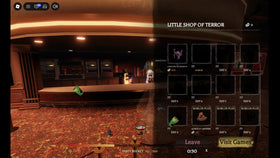
- Return to The Hollow hub and check the reward display, badge status, and avatar inventory.
- Leave the experience and rejoin once; then inspect the same reward again.
- If the issue remains, note the exact floor, item, badge, time, and what happened, then report it through Roblox Support or the Roblox DevForum.
- Never give a third-party site your password, cookie, verification code, or Robux in exchange for a “manual claim.”
Roblox’s general guidance for glitches is to describe exactly what happened, when it started, and whether it occurs in one experience or multiple experiences. See Roblox Support’s glitch-reporting guidance.
First, identify which part of the claim failed
The puzzle completed, but no relic appeared
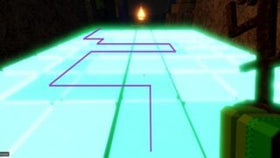
Check the live objective panel and the cauldron’s prompts before assuming the floor froze. Player guides report that Floor 6’s cauldron asks for colored ingredients in the displayed order, but the sequence can vary. If the final prompt did not register, the relic may not have spawned. Follow the screen in your own run rather than copying a fixed color sequence from a video.
You picked up the relic but did not make it back to the elevator
Community walkthroughs describe the relic as part of the Floor 6 escape objective. If the run ended before you returned to the elevator, the reward may not have been completed. Re-open the event and read the objective before trying again. Do not assume that solving the room alone guarantees the item.
You escaped, but the badge or UGC is missing
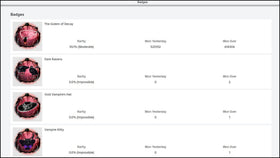
This is different from failing the puzzle. On October 23, players reported cases in which an event badge or UGC claim did not update correctly; a Roblox staff reply later asked one affected player to try rejoining. The report is evidence of a troubleshooting path, not a guarantee that rejoining will fix every account.
Relevant reports: ticket and item grant report and The Hollow UGC claim report.
Safe recovery checklist before you repeat Floor 6
- Capture evidence: save the exact error, completed objective, badge page, or claim button state. Hide personal information if you share a screenshot publicly.
- Rejoin once: fully leave the experience, reopen the official The Hollow experience, and check the hub again.
- Check the correct account: confirm you are signed into the Roblox account that completed the run.
- Check both places: review the event hub’s claim display and the relevant inventory category. A badge and an avatar item are not necessarily the same record.
- Keep the details: write down the approximate time, floor number, objective, and whether the badge appeared.
- Report instead of sharing credentials: send the details through official Roblox support channels.
What not to do
Do not repeatedly clear the maze without first checking the badge and inventory; you could spend time repeating a challenge when the problem is only the claim display. Do not install “reward fix” extensions, download unknown executables, or share browser cookies or verification codes. Do not trust anyone who promises to add a limited UGC item to your account for a fee.
Also avoid treating a community post as proof that Roblox has acknowledged a platform-wide outage. The reports cited here are individual player experiences. Roblox’s official event announcement confirms that The Hollow has quests and UGC rewards, but it does not document a specific Floor 6 claim-glitch fix.
How much time is left to claim The Hollow rewards?
Roblox’s official announcement says the event’s live finale begins on the morning of October 31, 2026, and players can continue collecting rewards until noon Pacific Time on November 2. The finale date and the final collection deadline are different. If a reward is missing, document the issue and report it promptly rather than waiting until the last hours.
Official schedule: Roblox’s The Hollow Halloween event announcement.
Frequently asked questions
Will rejoining definitely fix a missing Floor 6 reward?
No. A Roblox staff reply in a community bug report asked an affected player to try rejoining, but that does not guarantee a fix for every situation. Rejoining is a reasonable first check after saving evidence.
Should I redo the cauldron puzzle if my item is missing?
Not immediately. First verify the objective, return to the hub display, check your badge and inventory, and rejoin once. If the claim still fails, report the problem with evidence before investing more time in another run.
Is The Hollow’s reward-claim deadline October 31?
No. Roblox says the live finale begins October 31, while reward collection continues until noon Pacific on November 2, 2026.
Where should I report a Roblox glitch?
Use Roblox Support’s glitch-reporting guidance or the appropriate Roblox DevForum bug-report category. Include what happened, when it began, and whether it affects only The Hollow or other experiences too.
Bottom line
If Floor 6 appears to glitch during a claim, preserve evidence, rejoin once, check both the event hub and inventory, and report the exact failure through official Roblox channels. Community reports show that some The Hollow claims have failed to update, but they do not prove a universal outage. The most useful thing you can do is record the step that failed and avoid handing account access to anyone offering an unofficial fix.
Reporting note: Updated October 28, 2026. Roblox’s official event announcement and Support guidance were checked alongside player bug reports. The troubleshooting advice above is practical guidance, not a promise that every missing reward can be restored.